鶴来浄水場油流入事故タイムライン(2026年)
2月10日:検知から供給停止まで
- 12:56:水質計が油分を検知。
- 13:30:職員が取水口の水を採取し、「油臭」を確認。
- 13:40:手取川からの取水を停止。オイルフェンス設置、活性炭注入開始。
- この間、流入した水は「着水井(浄水場の入口)」で留め、浄水設備へは流さない措置。
- 14:30:13市町に対し、供給停止の可能性(第一報)を順次連絡。
- 15:00:分析の結果、油分濃度が13時時点の4分の1に減少。「早期再開が可能か」と注視を続ける。
- 15:50:活性炭処理でも油臭が消えないため、着水井に溜まった水の「排水」に切り替え。
- 18:00:臭気が無くならないことから、「県水供給停止」を最終判断。
- 18:35:報道機関へ資料提供。(覚知から約5時間半後)
- 19:00:13市町への供給を停止。
- 21:00:水質検査で「油分・臭気ともにゼロ」を確認。
- 21:30:取水再開。
- 23:30:13市町への県水供給を全面再開。
2月11日:原因調査の開始と記者会見
- 午前:知事指示により、警察・消防と連携した現地調査を開始。監視カメラに事件性の形跡なし。
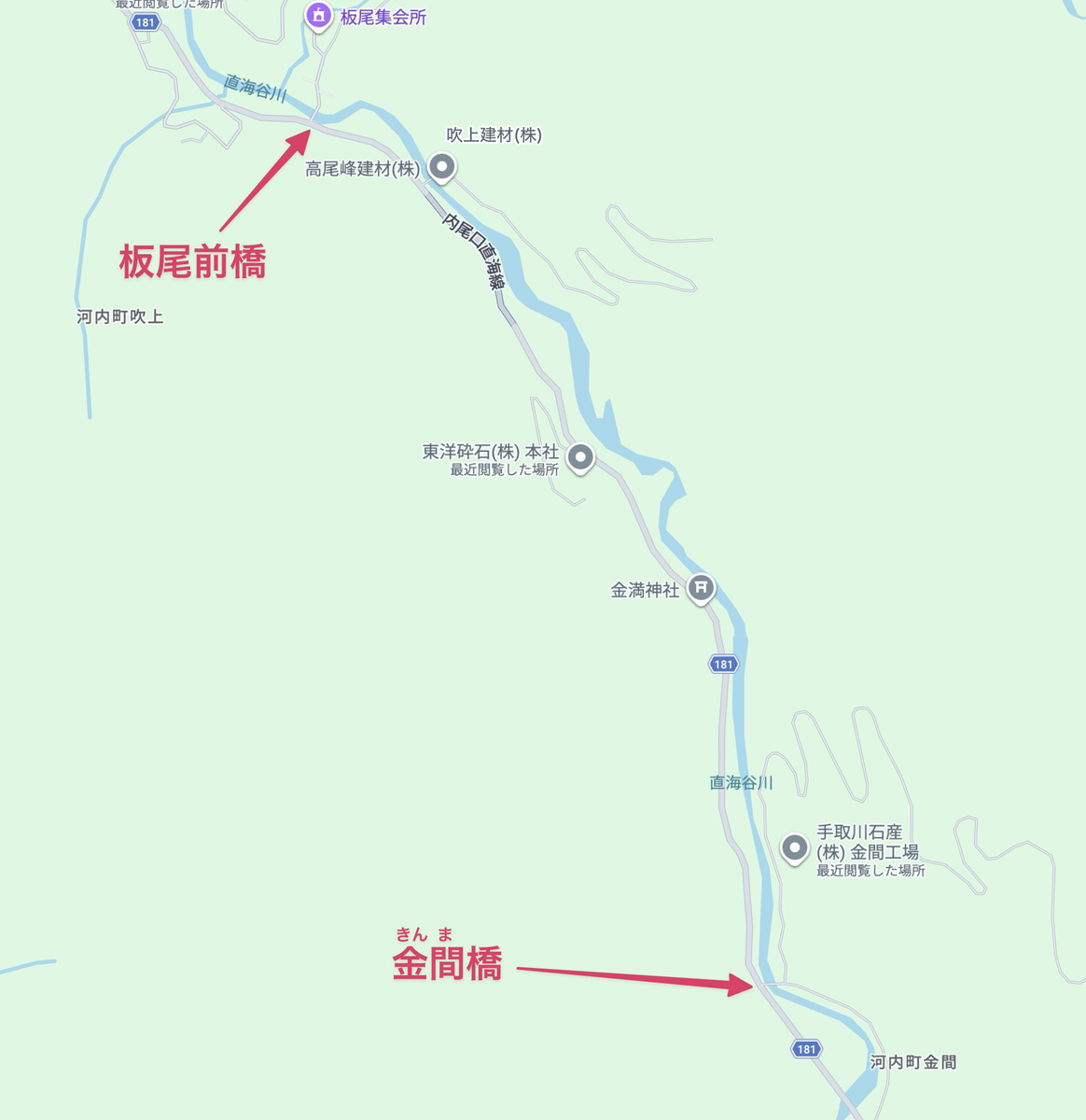
- 日中:川を遡る「しらみつぶし調査」を実施。
- 広瀬大橋(合流点)右岸で弱い油臭を確認。
- 板尾前橋(上流)で油臭を確認。
- 金間橋(さらに上流)では確認されず。
- 結論:板尾前橋〜金間橋の間が発生源と絞り込む。
- 15:45:知事記者会見。
-マニュアルに基づいた適切な対応であったと強調。
- 「万が一を想定した身を守る行動(水の確保)」は県民として必須であると言及。
- 成分分析の結果判明には「2週間」を要すると発表。
その後の展開(幕引きまで)
- 2月16日:上流の事業者が「10日に事故を発生させた」と県に報告(約100リットルの軽油漏洩)。
- 2月17日:知事が事業者からの報告を公表。ただし「原因と断定できない」として社名は非公表。
- 2月18日:手取川石産が公式サイトで「一部ネットの情報は事実無根」と声明。
- 3月3日:石川県が最終分析結果を公表。
- 「同一の油とは断定できなかった」として、調査を終了。
- 理由は「外気に触れ、成分の一部が揮発したため」とされる。
参考文献
- 手取川における水質事故について / 2026年2月10日 / 石川県土木部水道企業課
- 記者会見の要旨 - 令和8年2月11日 -
- 記者会見の要旨 - 令和8年2月11日 - 質疑応答
- 石川県水道への油混入問題、周辺事業者が「油漏れ事故」と県に報告 / 2026年2月18日 11時00分 / 朝日新聞
- 油漏れ、事業者が報告 県水停止の10日 手取川上流で 県に6日後「100リットル流出」 / 2026/2/18 05:00 / 北國新聞
- 不明のまま調査終了…石川県白山市の鶴来浄水場に油が混入した問題 水の分析行うも原因の特定には至らず / 2026/03/03(火) 18:23 / 石川テレビニュース
ForkLift 3 で SSH トンネルとパスフレーズ付きの秘密鍵を使う
環境は次の通り
- ForkLift 3 Version 3.4.5
- SSH Tunnel Manager v2.2.7
次の構成の場合の設定方法
- 経由サーバ nobita (nobita@192.168.111.222:19222)
- 目的サーバ dora (dora@172.16.33.44:22)
- プロトコル: SFTP
~/.ssh/config
Host *
 # 鍵認証のみ使用する
 IdentitiesOnly yes
 # ssh-agent を使用する
 AddKeysToAgent yes
 # パスフレーズを記憶する
 UseKeychain yes

Host nobita
 HostName 192.168.111.222
 Port 19222
 User nobita
 IdentityFile ~/.ssh/nobita_priv.pem
SSH Tunnel Manager Preferences
Login: nobita
Host: nobita
Port: 19222

Local redirections (Port / Remote Host / Port)
20044 / 172.16.33.44 / 22
ForkLift
Protocol: SFTP
Server: 127.0.0.1
Username: dora
Password: <Public Key Authentication>(~/.ssh/dora_priv.pem)
Port: 20044
上記のように設定したら、ターミナルから ssh-agent に鍵を登録する
ssh-add -K ~/.ssh/dora_priv.pem
-K オプションを付けることにより、パスフレーズをキーチェーンに保存することができる
If your private key is protected with a passphrase, then open Terminal (Applications > Utilities > Terminal) and run this command to add the passphrase to the ssh-agent:
ssh-add -K /path/to/private_keyHow to connect to SFTP using a passphrase protected private key on macOS 10.12 or later?
Affinity Publisher で欧文のみ文字スタイルを設定する
1. スタジオ「検索して置換」を開き、「検索」欄に次の内容を入力する(\u1eff は ỿ に置き換わる)。
[ -\u1eff]+
2. 必要であれば歯車のアイコンから検索対象のフォーマット(段落スタイル)を選択する
3. 「次で置換」の歯車のアイコンから文字スタイルを選択する
4. 「すべて置換」

クラウドナインのCD/DVDレーベル印刷で使える色
2021年10月現在、CDプレス・DVDプレスを格安で行える「クラウドナイン」のレーベル面シルク印刷で使える色は次の通り。
- DIC 5
- DIC 9
- DIC 16
- DIC 21
- DIC 23
- DIC 50
- DIC 60
- DIC 66
- DIC 68
- DIC 76
- DIC 81
- DIC 92
- DIC 94
- DIC 95
- DIC 102
- DIC 106
- DIC 107
- DIC 111
- DIC 118
- DIC 122
- DIC 123
- DIC 125
- DIC 132
- DIC 137
- DIC 138
- DIC 140
- DIC 141
- DIC 143
- DIC 154
- DIC 156
- DIC 157
- DIC 158
- DIC 159
- DIC 161
- DIC 163
- DIC 174
- DIC 175
- DIC 182
- DIC 183
- DIC 185
- DIC 189
- DIC 197
- DIC 202
- DIC 212
- DIC 213
- DIC 215
- DIC 220
- DIC 222
- DIC 223
- DIC 226
- DIC 232
- DIC 234
- DIC 236
- DIC 242
- DIC 251
- DIC 255
- DIC 283
- DIC 297
- DIC 305
- DIC 332
- DIC 334
- DIC 339
- DIC 409
- DIC 433
- DIC 434
- DIC 435
- DIC 492
- DIC 513
- DIC 546
- DIC 548
- DIC 563
- DIC 567
- DIC 568
- DIC 579
- DIC 582 黒
- DIC 582M マット黒
- DIC 583 白
- DIC 591
- DIC F27 純白
- DIC 4000
- DIC 618 銀
- DIC 619 金
- DIC 620 金
- DIC 636
- DIC 640
- DIC 641
- DIC 705
- DIC 2010
- DIC 2269
- DIC 2498
- DIC C62
- DIC F41
- DIC F101
- DIC P442
- DIC C308 特殊色
- DIC 618M マット銀
- DIC C309 特殊色
- DIC 620M マット金
- DIC TY10 透明色
- DIC TC10 透明色
- DIC TO06 透明色
- DIC TM10 透明色
- DIC TB10 透明色
- DIC TC02 透明色
- DIC TR55 透明色
- DIC TG20 透明色
- DIC SP-1 透明色
WordPress の Contact Form 7 プラグインが動かなくなったときの対処法
症状
WordPress の Contact From 7 プラグインを導入しているサイトで、お問い合わせフォームを送信するとプログレスアイコンが回ったまま送信できない。
お問い合わせ送信時のリクエスト POST /wp-json/contact-form-7/v1/contact-forms/8/feedback を見てみると、コード 404 で次のエラーが返ってきている。
{
	"code": "rest_no_route",
	"message": "URLとリクエストメソッド(request method)に合ったルートがありません",
	"data": {"status": 404}
}
どうも問題が発生する Contact Form 7 のバージョンは 4.8 らしい。
原因1:カスタム投稿タイプの show_in_rest が有効でない
カスタム投稿タイプを使用している場合、register_post_type() でカスタム投稿タイプを作成する際に show_in_rest というオプションを指定する必要がある。
<?php
register_post_type('CustomPage', [
	'public' => true,
	'label' => 'カスタムページ',
	...
	'show_in_rest' => true,
]);
原因2:サーバの設定で rewrite (Apache の場合) が設定されている
サーバが Apache の場合は次の順で原因を調べる。
1. WordPress のインストールディレクトリに .htaccess があれば内容を確認し、/wp-json/... がマッチするルールがないか確認する
2. なければその親ディレクトリを順に調べる
3. それもなければ Apache の設定ファイルを調べる
さくらのレンタルサーバの場合
今回の場合はさくらのレンタルサーバを使用しており、ユーザ領域以外で次のルールが設定されているようだ。
- URL の末尾にスラッシュ / がなく、ファイルとしてリソースが存在しない場合は自動的にスラッシュ / を付加した URL にリライトする
この動作をユーザ領域で上書きするため、WordPress のインストールディレクトリにある .htaccess に次の設定を記述する。
# /wp-json/ で始まるリクエストは、URL はそのままで index.php で処理する
RewriteEngine On
RewriteCond %{REQUEST_URI} ^/wp-json/ [NC]
RewriteRule .* index.php [L]
